DNA Logo

Brand Guidelines

A comprehensive guide to the DNA brand identity, visual language, and communication standards.

BRAND STORY

Redefining Enterprise Intelligence

DNA isn't just another enterprise resource planning system. It's a complete rethinking of how businesses operate, built from the ground up with modern design and intelligent automation at its core.

We believe that enterprise software should be as intuitive and beautiful as consumer products. Our mission is to transform complex business operations into seamless, intelligent workflows that empower teams and drive growth.

Powered by Solution ERP and trusted by businesses from startups to Fortune 500 companies, DNA represents the next generation of enterprise software—where AI-powered automation meets human-centered design.

Core Values

Innovation

Pioneering new technologies and approaches that transform how businesses operate.

Simplicity

Making complex enterprise systems simple, fast, and intuitive for real people.

Intelligence

AI-powered automation that learns, adapts, and empowers smarter decision-making.

Excellence

Obsessing over every detail to deliver operational excellence and real results.

COLOR PALETTE

Brand Colors

Primary Colors

DNA Black

HEX: #000000

RGB: 0, 0, 0

CMYK: 0, 0, 0, 100

Primary background, text, and logo color. Represents sophistication and technology.

DNA Pampas

HEX: #F8F7F3

RGB: 248, 247, 243

CMYK: 2, 1, 3, 0

Secondary background color. Warm cream tone that provides elegant balance to dark elements.

DNA Pomegranate

HEX: #F3350C

RGB: 243, 53, 12

CMYK: 0, 78, 95, 5

Accent color for CTAs, bullets, highlights, and interactive elements. Bold energy and innovation.

Secondary Colors

White

#FFFFFF

Tundora

#434343

Silver

#C7C7C7

Alto

#DDDDDD

Mercury

#E3E3E3

Gradient Effects

Vibrant chromatic gradients are used sparingly for hero sections, feature highlights, and visual emphasis. These create the signature "intelligent" and "futuristic" feel of the DNA brand.

Rainbow Gradient

linear-gradient(90deg, #f5bc0d, #e45e35, #931b0b, #885ff2, #0e0486, #e4ee79)

Usage

Hero backgrounds, feature cards, chromatic aberration effects

Buttercup

#F5BC0D

Flame Pea

#E45E35

Totem Pole

#931B0B

Cornflower

#885FF2

Navy Blue

#0E0486

Manz

#E4EE79

TYPOGRAPHY

Type System

PRIMARY TYPEFACE

Inter

ABCDEFGHIJKLMNOPQRSTUVWXYZ

abcdefghijklmnopqrstuvwxyz

0123456789 !@#$%^&*()

About Inter

Inter is a typeface carefully crafted & designed for computer screens. It features a tall x-height to aid in readability of mixed-case and lower-case text. Several OpenType features are provided as well, like contextual alternates that adjusts punctuation depending on the shape of surrounding glyphs.

Font Weights

Regular (400) - Body text

Medium (500) - Subheadings

Semibold (600) - Labels

Bold (700) - Headings

Type Hierarchy

Heading 1

60px / 700 weight / -0.02em tracking

Heading 2

48px / 700 weight / -0.01em tracking

Heading 3

36px / 700 weight / -0.01em tracking

Heading 4

24px / 600 weight / normal tracking

Body Large - The quick brown fox jumps over the lazy dog

18px / 400 weight / 1.6 line-height

Body Regular - The quick brown fox jumps over the lazy dog

16px / 400 weight / 1.5 line-height

ARABIC TYPEFACE

IBM Plex Sans Arabic

ابجد هوز حطي كلمن سعفص قرشت ثخذ ضظغ

أ ب ت ث ج ح خ د ذ ر ز س ش ص ض ط ظ ع غ ف ق ك ل م ن ه و ي

0123456789 !@#$%^&*()

About IBM Plex Sans Arabic

IBM Plex Sans Arabic is a corporate typeface designed for IBM's global brand. It features a modern, clean design with excellent readability across digital platforms. The Arabic variant perfectly complements the Latin typeface, maintaining the same technical precision and contemporary feel.

Font Weights

Thin (100) - مرحبا بكم

ExtraLight (200) - مرحبا بكم

Light (300) - مرحبا بكم

Regular (400) - مرحبا بكم

Medium (500) - مرحبا بكم

Semibold (600) - مرحبا بكم

Bold (700) - مرحبا بكم

Arabic Type Hierarchy

العنوان الأول

60px / 700 weight / -0.02em tracking

العنوان الثاني

48px / 700 weight / -0.01em tracking

العنوان الثالث

36px / 700 weight / -0.01em tracking

العنوان الرابع

24px / 600 weight / normal tracking

نص كبير - الذكاء الاصطناعي الذي يعمل من أجلك

18px / 400 weight / 1.6 line-height

نص عادي - الذكاء الاصطناعي الذي يعمل من أجلك

16px / 400 weight / 1.5 line-height

DATA VISUALIZATION

Brand Charts

Visualize data with our branded chart templates. Each chart is designed to maintain brand consistency while presenting information clearly and beautifully.

Chart Templates

Revenue GrowthQuarterly PerformanceQ1Q2Q3Q445%68%55%82%

Vertical Bar Chart

#F3350C
#E45E35
#885FF2
#F5BC0D
User GrowthMonthly Active Users100k75k50k25k0kJanFebMarAprMayJun

Line Chart

#F3350C
#885FF2
Market ShareProduct Distribution100%Product A (40%)Product B (30%)Product C (20%)

Donut Chart

#F3350C
#885FF2
#F5BC0D
#E45E35
PerformanceComparative AnalysisJanFebMarAprMayJun

Area Chart

#F3350C
#885FF2
Feature AdoptionUsage StatisticsAnalytics85%Reports70%Dashboard92%API60%

Horizontal Bar Chart

#F3350C
#E45E35
#885FF2
#F5BC0D
Goal ProgressQ4 Targets75%CompleteRevenue 75%Users 60%NPS 90%

Radial Progress

#F3350C
#885FF2
#F5BC0D

Chart Usage Guidelines

Do's

  • •Use brand colors consistently across all charts
  • •Ensure text is legible with proper contrast ratios
  • •Include clear labels and units for all data points
  • •Maintain consistent spacing and alignment
  • •Use Inter font family for all chart text

Don'ts

  • •Don't use colors outside the brand palette
  • •Don't overcomplicate charts with too many data series
  • •Don't use 3D effects or unnecessary embellishments
  • •Don't skip axis labels or legends
  • •Don't use low contrast color combinations

Color Accessibility

All chart colors meet WCAG AA accessibility standards when used with appropriate backgrounds. For critical data visualization, consider adding patterns or textures in addition to color to ensure accessibility for color-blind users. Always test charts in grayscale to verify readability.

IMAGERY STYLE

Visual Language

3D Visualizations

Sleek, modern 3D renderings of product interfaces, data visualizations, and abstract technological elements. Use dark backgrounds with vibrant accent colors.

  • • Isometric perspective preferred
  • • Clean, minimal composition
  • • Reflective materials and glass effects
  • • Neon accent lighting

Photography Style

Professional, candid shots of people in business environments. Natural lighting, authentic moments, diverse representation.

  • • Real people, real scenarios
  • • Shallow depth of field
  • • Neutral or minimalist backgrounds
  • • Focus on human connection

UI Screenshots

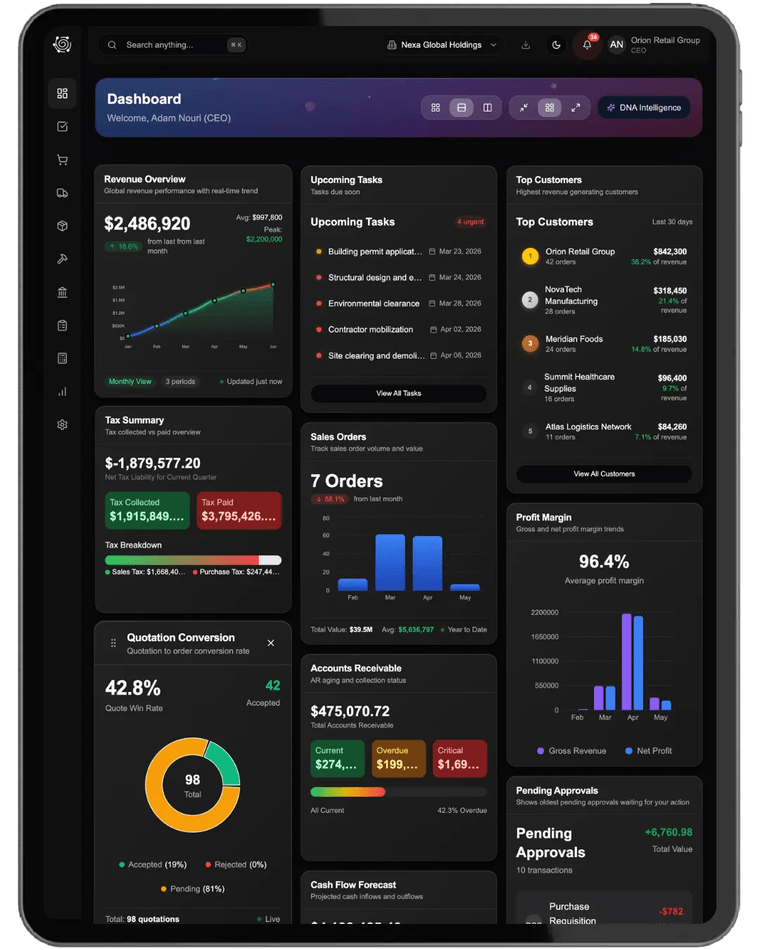
Product screenshots should showcase real functionality with realistic data. Apply subtle shadows and perspective transforms to add depth.

Device Mockups

Use clean, modern device frames. MacBook, iPad, iPhone preferred.

Perspective

Slight 3D rotation (5-15°) for depth. Never flat straight-on.

Context

Show UI in use with realistic data, not lorem ipsum.

Chromatic Aberration Effect

A signature visual element that adds energy and a "digital" feel to hero images and feature highlights. Use sparingly for maximum impact.

RGB offset: Red +2px, Blue -2px horizontal | Apply to edges of images and text

PHOTOGRAPHY SPECIFICATIONS

Detailed Photography Guidelines

Technical Specs

Resolution

Minimum 300 DPI for print
72-150 DPI for web

Format

RAW preferred, JPEG acceptable
PNG for transparency

Color Profile

sRGB for web
Adobe RGB for print

Aspect Ratios

16:9 (hero), 4:3 (features)
1:1 (social), 9:16 (stories)

Lighting & Composition

Lighting Style

Natural or studio lighting with soft shadows. Avoid harsh direct flash.

Rule of Thirds

Position subjects at intersection points. Leave negative space.

Depth of Field

f/2.8-f/5.6 for portraits
f/8-f/11 for environmental shots

White Balance

Accurate skin tones, slightly warm (5200-5500K)

Subject Matter

People

Authentic moments, diverse representation, business casual attire

Environments

Modern offices, clean workspaces, natural light

Technology

Modern devices in use, realistic data on screens

Details

Close-ups of hands on keyboards, collaborative moments

Photography Do's & Don'ts

✓ Do
  • • Capture authentic, candid moments
  • • Show diversity in age, gender, and ethnicity
  • • Use natural lighting when possible
  • • Include negative space for text overlay
  • • Show real product interfaces with realistic data
  • • Maintain consistent color grading across sets
  • • Focus on storytelling and emotion
✗ Don't
  • • Use overly staged or posed shots
  • • Over-process images with heavy filters
  • • Include competitor logos or branding
  • • Use stock photos that look generic
  • • Show outdated technology or interfaces
  • • Overcrowd compositions with clutter
  • • Use harsh shadows or unflattering angles

Post-Processing

Color Correction

Slightly increase contrast (+10-15%), subtle saturation boost. Maintain natural skin tones.

Sharpening

Moderate sharpening (40-60 amount, 1.0 radius) for web. No oversharpening halos.

Noise Reduction

Apply minimal noise reduction to maintain detail. ISO 800+ may need luminance smoothing.

Vignetting

Subtle darkening of edges (5-10%) to draw focus to subject.

Image Optimization

Web Optimization

Use WebP format when possible. JPEG quality 80-85%. Compress with tools like ImageOptim.

Lazy Loading

Implement lazy loading for images below the fold. Use low-quality image placeholders (LQIP).

Responsive Images

Provide multiple sizes for different viewports. Use srcset and sizes attributes.

Alt Text

Write descriptive alt text for accessibility. Include context and key visual elements.

PATTERNS & ELEMENTS

Reusable Vector Assets

A library of vector patterns and decorative elements designed to enhance DNA brand materials. Use these assets to add visual interest while maintaining brand consistency.

Geometric Patterns

Dot Grid

Subtle background pattern for sections and hero areas

Diagonal Lines

Dynamic texture for overlays and backgrounds

Structural Grid

Technical aesthetic for data and analytics sections

Gradient Patterns

Radial Gradient

From Pomegranate to Black

Use for hero sections and feature highlights

Chromatic Gradient

Full brand spectrum

Signature DNA gradient for special campaigns

Decorative Shapes

Abstract Elements

Usage Examples

Hero Section Background

Transform Your Business

Intelligent ERP that works for you

Feature Card Accent

AI-Powered Automation

Streamline operations with intelligent workflows

Pattern Usage Guidelines
  • •Use patterns at 20-40% opacity for subtle backgrounds
  • •Combine patterns with solid brand colors for depth
  • •Decorative elements should never interfere with readability
  • •Use chromatic gradients sparingly for maximum impact
  • •Abstract elements work best in hero sections and backgrounds

TONE OF VOICE

How We Communicate

Brand Voice Attributes

Confident, Not Arrogant

We know our product is exceptional, but we let results speak louder than claims. We're assured yet humble.

Clear, Not Corporate

We avoid jargon and speak in plain language. Complexity is our job to solve, not yours to decode.

Innovative, Not Trendy

We push boundaries with purpose, not for the sake of being different. Every innovation serves our users.

Human, Not Robotic

Technology serves people. We write with warmth and empathy while maintaining professionalism.

Writing Guidelines

Do:

"Transform your operations with intelligent automation"

Don't:

"Leverage our synergistic solutions to optimize your business processes"

Do:

"Built for real people, not just enterprises"

Don't:

"Engineered for mission-critical enterprise stakeholders"

Headlines

Bold, direct, and memorable. Lead with benefits, not features.

"Not just an ERP. It's a productivity engine."

Body Copy

Conversational yet professional. Short sentences. Active voice.

"We transformed the ERP experience from the ground up."

CTAs

Action-oriented and specific. Tell users exactly what happens next.

"Schedule Demo" not "Learn More"

Brand Voice Examples

Website Hero

"Intelligence that works for you"

Not: "Leverage cutting-edge AI to optimize workflows"

Feature Description

"Your data, beautifully organized"

Not: "Advanced data management solution"

Email Subject

"3 ways DNA saved teams 15 hours/week"

Not: "Unlock productivity gains with DNA"

Product Update

"We just made reporting 10x faster"

Not: "Enhanced reporting capabilities now available"

Error Message

"Something went wrong. We're on it."

Not: "Error 500: Internal server exception"

Onboarding

"Let's get you set up in 5 minutes"

Not: "Initialize your account configuration"

Social Media

"When ERP finally makes sense 🎯"

Not: "Our platform delivers unparalleled value"

Customer Support

"Happy to help! What can we solve for you?"

Not: "Please submit a detailed support ticket"

Messaging Principles

Show, Don't Tell

"Save 15 hours per week" beats "Increase productivity"

Benefits Over Features

"Never miss a deadline" beats "Automated task scheduling"

Active Voice

"We built this for you" beats "This has been designed for users"

BRAND APPLICATIONS

Where Our Brand Lives

Digital Applications

Website

Primary brand touchpoint. Dark hero sections with gradient accents.

Product Interface

Clean, minimal UI with consistent spacing and typography.

Email Templates

Simple layouts, plenty of white space, clear CTAs.

Social Media

Consistent visual style, mix of product shots and thought leadership.

Print Applications

Business Cards

Black background, white logo and text. Minimal design.

Presentations

Dark slides with large, bold headlines. One idea per slide.

Brochures

Clean layouts, generous white space, professional photography.

Swag

Subtle branding, high-quality materials. Logo only, no taglines.

Layout Principles

Generous Space

Embrace white space. Less is more.

Consistent Grid

8px baseline grid system.

Clear Hierarchy

Guide the eye with contrast.

Alignment

Everything aligns to grid.

BRAND GUIDELINES

Do's & Don'ts

Logo Usage

Wrong usage

Don't

Change logo colors

Wrong usage

Don't

Scale below minimum size

Wrong usage

Don't

Use logomark without wordmark in most contexts

Color Usage

Do

Use primary colors as specified

Don't

Introduce new brand colors

Don't

Use gradients on primary colors

Typography

Clean Hierarchy

Do

Maintain clear type hierarchy

Different Font

Don't

Use fonts other than Inter

Skewed Text

Don't

Distort or skew typography

IMPLEMENTATION

Brand in Action

Business Card - Front

DNA Logo

Sarah Johnson

Chief Product Officer

Business Card - Back

sarah.johnson@dna.systems

+1 (555) 123-4567

www.dna.systems

123 Innovation Drive, San Francisco, CA 94105

Social Media - Impact Stats

DNA Logo

98%

faster operations

in the first month with DNA

Social Media - Feature Highlight

DNA Logo

AI-Powered
Automation

Let intelligence handle the repetitive work while your team focuses on what matters.

Email Template

Welcome to DNA

Your journey to smarter operations starts here.

Get Started →

Presentation Slide

DNA Logo

One idea
per slide

Keep it simple. Keep it bold.

DNA Brand Guidelines 2025 | Slide 12

PRINT COLLATERAL

Stationery & Print Materials

📄 Letterhead Generator

Customize and print your DNA letterhead

Preview

DNA Logo

January 15, 2025

John Smith Acme Corporation 123 Business Street New York, NY 10001

Re: Partnership Proposal

Dear John, We are excited to explore potential partnership opportunities between DNA Systems and Acme Corporation. Our AI-powered ERP platform has helped companies like yours streamline operations and achieve measurable results. We believe there's strong alignment between our solutions and your business objectives. I would love to schedule a call next week to discuss this further. Best regards,

Sarah Johnson

Chief Product Officer

123 Innovation Drive, San Francisco, CA 94105www.dna.systems

✉️ Email Template Generator

Customize and copy/download your branded email

Navigation Links

📋 How to Use:

  1. Fill in your email details above
  2. Click "Copy HTML" to copy the email template
  3. Paste into your email client or marketing platform
  4. Or click "Download" to save as an HTML file

Preview

Welcome to DNA

Your journey to smarter operations starts here.

Get Started →

Best regards,

Sarah Johnson

sarah.johnson@dna.systems

© 2025 DNA Systems. Powered by Solution ERP.

💼 Business Card Generator

Customize and print your DNA business cards

📐 Print Specifications

Standard size: 3.5" × 2" • 16pt Silk stock • Matte finish • Rounded corners

Preview

Front

DNA Logo

Sarah Johnson

Chief Product Officer

Back

sarah.johnson@dna.systems

+1 (555) 123-4567

www.dna.systems

✉️ Envelope Generator

Customize and print your DNA envelopes

Return Address

Recipient Address

📐 Specifications

#10 Envelope: 9.5" × 4.125" • 24lb Wove • Pampas background

Preview

DNA Logo
DNA Systems
123 Innovation Drive
San Francisco, CA 94105
John Smith
Acme Corporation
456 Business Avenue
New York, NY 10001

✍️ Email Signature Generator

Create your professional DNA email signature

📋 How to Use:

  1. Fill in your information above
  2. Click "Copy HTML" to copy the signature
  3. Paste into your email client's signature settings
  4. Upload the DNA logo separately if needed

📌 Logo Information:

The DNA logo is hosted on dna.systems and will display automatically in all email clients. The signature uses professional SVG icons for email, phone, website, and address.

Live Preview

DNA Logo
Sarah Johnson
Chief Product Officer
123 Innovation Drive, San Francisco, CA 94105

DNA Systems | Powered by Solution ERP

Compatible with:

GmailOutlookApple MailThunderbirdYahoo Mail

Transaction Approval Notification

System notification for ERP transaction approvals

ERP Integration:

This email template is designed for automated transaction approval workflows. The approval/reject links should be dynamically generated by your ERP system to include proper authentication tokens.

Live Preview

DNA ERPNORMAL PRIORITY

Transaction Approval Required

Hello Ahmed, you have a pending approval request

Transaction Type

Purchase Order

Reference

PO-2025-001847

Requested By

Sarah Johnson

Department

Procurement

Description

Office equipment and IT supplies for Q1 2025

Total Amount

$24,500.00

This is an automated notification from DNA ERP System.

If you have questions, please contact your system administrator.

www.dna.systems

© 2025 DNA Systems | Powered by Solution ERP

Use Cases:

Purchase OrdersInvoicesExpense ClaimsBudget RequestsTransfers

Transaction Status Notification

Notify users when their transaction is approved or rejected

Approval Notification

This email notifies the requester that their transaction has been approved.

Live Preview

DNA ERPAPPROVED

Transaction Approved

Hello Sarah, your transaction has been approved

Your request has been approved

Transaction Type

Purchase Order

Reference

PO-2025-001847

Approved By

Ahmed Al-Hassan

Finance Director

Date & Time

March 13, 2025 at 2:45 PM

Comments

"Approved. Please proceed with the vendor order."

Total Amount

$24,500.00

This is an automated notification from DNA ERP System.

If you have questions, please contact your system administrator.

www.dna.systems

© 2025 DNA Systems | Powered by Solution ERP

Status Types:

ApprovedRejected

Task Automation Notification

Notify users when an automation rule is triggered

You can use {{entity.field}} for dynamic values

You can use {{entity.field}} for dynamic values

Available Variables:

Use {{entity.type}}, {{entity.name}}, {{field.name}}, {{field.oldValue}}, {{field.newValue}} for dynamic values.

Live Preview

DNA ERPAUTOMATION

Automation Triggered

Hello Ahmed, an automation rule has been triggered

New Lead requires your attention

A lead has been qualified and requires immediate follow-up. Please review the lead details and take appropriate action.

Rule Name

Follow up on qualified leads

Automatically notify sales team when a lead status changes to qualified

Trigger Details

Trigger Type

Field Changed

Entity Type

Lead

Entity Name

Acme Corporation

Field Changed: Status

New→Qualified

Action Executed

Send Notification

March 25, 2025 at 10:30 AM

This is an automated notification from DNA ERP System.

To manage your automation rules, visit the Automation Settings.

www.dna.systems

© 2025 DNA Systems | Powered by Solution ERP

Trigger Types:

Field ChangedRecord CreatedRecord UpdatedScheduled

Password Reset Email

Security notification for password reset requests

Security Features:

  • Time-limited reset link with configurable expiration
  • Request details (IP, browser) for security awareness
  • Security warning for unauthorized requests
  • Support contact for assistance

Live Preview

DNA ERPSECURITY

Password Reset Request

Hello Ahmed, we received a request to reset your password

We received a password reset request for your DNA ERP account associated with ahmed@company.com.

Click the button below to reset your password. This link will expire in 24 hours.

If the button doesn't work, copy and paste this link:

https://erp.dna.systems/reset-password?token=abc123xyz

Request Details

Requested AtMarch 25, 2025 at 10:30 AM
IP Address192.168.1.100
BrowserChrome on Windows

Didn't request this?

If you didn't request a password reset, ignore this email or contact support@dna.systems

This is an automated security notification from DNA ERP System.

For security reasons, this link will expire in 24 hours.

www.dna.systems

© 2025 DNA Systems | Powered by Solution ERP

Security Features:

Time-limitedIP TrackingBrowser InfoSecurity Warning

Scheduled Report Email

Sent automatically when a scheduled report is ready to view

Auto-generated subject line:

Scheduled Report: Annual P&L Breakdown - Weekly Report

  • Secure one-click link — no login required
  • Frequency & reporting period at a glance
  • Fully branded DNA ERP header & footer

Live Preview

DNA ERPSCHEDULED REPORT

Your Report Is Ready

Hello Mohamed, your scheduled report has been generated

Your scheduled report Annual P&L Breakdown — Weekly Report is ready to view.

No login required — opens instantly

Report Details

Report NameAnnual P&L Breakdown
FrequencyWeekly
Reporting PeriodFY 2024 (Jan 1 – Dec 31)
Generated AtMarch 25, 2025 at 7:00 PM

If the button doesn't work, copy and paste this link:

https://erp.dna.systems/reports/r/9a3f2b1c

This is an automated notification from DNA ERP System.

You're receiving this because you subscribed to a weekly delivery of this report.

www.dna.systems

© 2025 DNA Systems | Powered by Solution ERP

Report Features:

Auto-scheduledSecure LinkNo LoginOne-click View

Post-Demo Thank You Email

Premium thank you email after DNA ERP demo

Conversion Tips:

  • Personalize with specific demo highlights
  • Create urgency with time-limited offers
  • Show impressive stats and social proof
  • Make it easy to take the next step

Live Preview

DNA ERP

Thank You for Your Time

Dear Ahmed,

Thank you for exploring DNA ERP on March 25, 2025. It was a pleasure demonstrating how we can transform Acme Corporation.

"Companies using DNA ERP see an average 40% increase in efficiency within 6 months."

40%

Increase in Efficiency

60%

Faster Reporting

99.9%

System Uptime

Key Features We Covered:

✓

Real-time Analytics Dashboard

✓

Automated Workflow Engine

✓

Multi-currency Support

Exclusive Demo Offer

20% off OFF

Valid for 7 days only

Request Quote to Reserve Discount

Your Dedicated Contact

S

Sarah Johnson

Senior Solutions Consultant

sarah.johnson@dna.systems

DNA

Transform Your Business Operations

www.dna.systems

Email Highlights:

Premium DesignStats & Social ProofSpecial OfferDirect CTA

Cold Outreach Campaign Email

A fully configurable prospecting email with logo, product mockup & personalization tokens

Assets

Hosted on your site. Paste any public image URL (e.g. your own CDN) to swap it.

Personalization

Hero

Body

Tip: type {name} or {company} anywhere — they're replaced automatically (perfect for mail-merge).

Benefits

Call to Action

Signature

Footer & Compliance

Live Preview

DNA ERP
All-in-one ERP

Run your entire business from one platform

DNA ERP dashboard preview

Hi Ahmed,

I came across Acme Corporation and thought this might be relevant. As teams scale, finance, inventory, and sales data usually end up scattered across spreadsheets and disconnected tools.

DNA ERP unifies your operations into one real-time system — so your team stops chasing data and starts making faster, better decisions.

Real-time dashboards

Track cash flow, inventory, and sales the moment they change.

Automate the busywork

Approvals, invoicing, and reporting run on autopilot.

One source of truth

Finance, sales, and HR all work from the same live data.

Book a 15-minute demo →

Sarah Johnson

Solutions Consultant, DNA ERP

sarah.johnson@dna.systems · +1 (555) 123-4567

www.dna.systems© 2025 DNA Systems

DNA Systems · 123 Innovation Drive, San Francisco, CA 94105

You're receiving this one-time message as part of a business introduction. Unsubscribe

Campaign-ready:

Mail-merge tokensPreheader textOutlook-safe tablesUnsubscribe footer

Design Specifications

Detailed mockups and print-ready specifications for all stationery

Letterhead Specifications

DNA Logo
123 Innovation Drive, San Francisco, CA 94105
www.dna.systems

Specifications

Size:8.5" × 11" (Letter)
Paper:24lb Bond, Pampas (#F8F7F3)
Bleed:0.125" all sides
Color Mode:CMYK

Design Guidelines

  • • Logo positioned 1" from top, 1" from left
  • • Red accent bar below logo for brand recognition
  • • Footer with address centered at 0.75" from bottom
  • • Body text starts 3" from top
  • • Use DNA Pampas background for warmth

Typography

Body: Inter Regular 11pt
Headers: Inter Semibold 14pt
Footer: Inter Regular 8pt

Business Envelope

DNA Logo
DNA Systems
123 Innovation Drive
San Francisco, CA 94105

Specifications

Size:#10 (9.5" × 4.125")
Paper:24lb Wove, Pampas
Window:None
Seal:Gummed

Design Elements

  • • Logo at 0.5" from top and left
  • • Return address in Inter Regular 8pt
  • • Pomegranate red accent bar at bottom
  • • Pampas background for sophisticated look

Business Cards

Front

DNA Logo

Sarah Johnson

Chief Product Officer

Back

sarah.johnson@dna.systems

+1 (555) 123-4567

www.dna.systems

Specifications

Size:3.5" × 2"
Paper:16pt Silk
Finish:Matte
Corners:Rounded 0.125"

Front Design

  • • Black (#000000) background
  • • Light logo variant
  • • Name in Inter Bold 14pt
  • • Title in Inter Regular 10pt
  • • Gradient accent element

Back Design

  • • Pampas (#F8F7F3) background
  • • Gradient circle watermark
  • • Contact info Inter 10pt
  • • Bottom-aligned layout
  • • 0.25" margins

Presentation Folder

Cover

DNA Logo

Enterprise Intelligence
Redefined

Powered by DNA Systems

Inside Panel

Business Card Slot

DNA Systems

123 Innovation Drive

San Francisco, CA 94105

www.dna.systems

Specifications

Size (Flat):9" × 12" (Letter size)
Stock:14pt C2S, Gloss
Pockets:Two 4" deep pockets
Business Card Slot:Right pocket
Finish:Spot UV on logo

Design Guidelines

  • • Cover: Black with white logo and gradient accent
  • • Inside: Pampas background for warmth
  • • Logo positioned 1.5" from top left on cover
  • • Tagline at bottom with 1.5" margin
  • • Contact info in right pocket footer
  • • Premium feel with spot UV finish

MERCHANDISE & PROMOTIONAL ITEMS

Brand in the Real World

Apparel Guidelines

T-Shirts
  • • Premium cotton or tri-blend fabric
  • • DNA logo centered on chest or small on left chest
  • • Black, White, or Pampas color options
  • • Subtle tagline on back optional
Hoodies & Outerwear
  • • Embroidered logo on left chest (2-3" wide)
  • • DNA wordmark on back between shoulders
  • • Premium fleece or technical fabric
  • • Black or charcoal recommended
Hats & Accessories
  • • Embroidered logomark on front center
  • • Structured or unstructured caps
  • • Black, navy, or white options

Office & Tech Items

Notebooks & Stationery
  • • Moleskine-style notebooks with debossed logo
  • • Pampas or black cover with pomegranate accent
  • • Minimalist grid or dotted pages
Laptop Stickers
  • • Die-cut DNA logomark (3" wide)
  • • White vinyl for dark surfaces
  • • Include inspirational taglines variants
Tech Accessories
  • • USB drives, charging cables, mouse pads
  • • Subtle logo placement (small, corner)
  • • Premium materials (leather, metal, bamboo)
Water Bottles & Drinkware
  • • Stainless steel or glass preferred
  • • Laser engraved logo for permanence
  • • Matte black or brushed steel finishes

Event & Trade Show Items

Booth Materials
  • • Pop-up banners (8' tall, DNA wordmark + tagline)
  • • Table runners (black with white logo)
  • • iPad stands with charging (branded base)
  • • Demo stations with product screenshots
Giveaways
  • • Premium pens (metal, etched logo)
  • • Sticker sheets (various logomark sizes)
  • • Tote bags (heavy canvas, screen print)
  • • Phone grips/stands (subtle branding)
Presentation Materials
  • • Branded folders (Pampas with logo)
  • • Product sheets (follow print guidelines)
  • • Business cards for team members
  • • USB drives with demo videos

Quality Standards

Materials

Use premium, sustainable materials that reflect brand values. Avoid cheap plastics or poor-quality fabrics.

Production

Work with certified vendors. Request samples before bulk orders. Ensure color matching to brand standards.

Packaging

Present merchandise thoughtfully. Use branded packaging for gifts. Include DNA story card with items.

Sustainability

Prioritize eco-friendly materials, ethical manufacturing, and minimal waste packaging.

Logo Application Tips

Size & Placement

Keep logos subtle and tasteful. Avoid oversized branding. Position thoughtfully based on item use.

Production Methods

• Embroidery: Apparel (premium feel)
• Screen Print: T-shirts, totes (cost-effective)
• Laser Engraving: Metal, wood, glass
• Debossing: Leather, notebooks (elegant)

Color Matching

Provide PMS colors to vendors. Request physical samples to verify. Account for material differences.

SOCIAL MEDIA

Platform Specifications

in

LinkedIn

Profile Image:400 × 400px (PNG)
Cover Photo:1584 × 396px
Post Image:1200 × 627px
Logo Variant:Icon (Dark)
𝕏

X (Twitter)

Profile Image:400 × 400px (PNG)
Header Photo:1500 × 500px
Post Image:1200 × 675px
Logo Variant:Icon (Light)
f

Facebook

Profile Image:180 × 180px (PNG)
Cover Photo:820 × 312px
Post Image:1200 × 630px
Logo Variant:Icon (Dark)

Instagram

Profile Image:320 × 320px (PNG)
Post (Square):1080 × 1080px
Story:1080 × 1920px
Logo Variant:Icon (Light or Dark)

Profile Image Guidelines

DNA Icon

Use icon-only logomark for profile images on all platforms

DNA Icon

Safe zone

Maintain 20% padding on all sides for circular crops

DNA Icon

Brand color backgrounds acceptable for special campaigns

ICONOGRAPHY

Icon System

Icon Style

  • Line-based: 2px stroke weight, rounded caps and joins
  • Grid: 24×24px base size, scale proportionally
  • Simplicity: Minimal detail, geometric forms
  • Consistency: Uniform visual weight across set
  • Colors: Use DNA Black (#000) or Pomegranate (#F3350C) for accents

Sample Icon Set

Size Variants

16px, 24px, 32px, 48px

Usage

Interface actions and navigation

Feature illustrations

Never as decorative elements

Don't

❌ Rotate or distort icons

❌ Mix with other icon sets

❌ Use gradient fills

ILLUSTRATION STYLE

Visual Storytelling

Illustration Principles

Modern & Geometric

Clean lines, simple shapes, and geometric forms. Avoid overly detailed or organic illustrations.

Isometric Perspective

Prefer isometric or 2.5D perspective for technical and UI illustrations. Creates depth while maintaining clarity.

Limited Color Palette

Use brand colors exclusively. DNA Black for outlines, Pomegranate for accents, Pampas for backgrounds.

Flat Design with Depth

Flat color fills with subtle shadows or gradients to suggest depth. Avoid heavy skeuomorphism.

Use Cases

Feature Explanations

Illustrate complex features with simple diagrams. Show workflows, data flows, and system architecture.

Empty States

Friendly illustrations for empty data tables, missing search results, or onboarding screens.

Error & Success States

Visual feedback for user actions. Keep optimistic and helpful, never scary or punishing.

Marketing Materials

Hero illustrations for landing pages, email campaigns, and presentations.

Downloadable Illustrations

Isometric Data Cube

3D data visualization with brand colors

Network Nodes

Connected systems and data flow visualization

Dashboard Interface

Modern UI with data visualization elements

Server Stack

Isometric infrastructure visualization

STARTPROCESSANALYZEOUTPUTEND

Workflow Diagram

Process flow with brand styling

Success State

Positive user feedback illustration

3D Warehouse Visualization

Navigate zones, racks, bins with live heatmaps

BANK STATEMENTAI99%+

AI-Powered Bank Statements

Auto-match with 99%+ accuracy

$€£¥Supplier A$1,2003 days • Quality A1Supplier B$1,4505 days • Quality B2Supplier C$1,3804 days • Quality A3AWARDEDAWARD & GENERATE POFX-AWARE

One-Click Supplier Awards

Compare, split-award, and generate POs instantly

CUSTOM FORMTextNumberDateFileField 1Field 2Field 3Field 470 seconds

No-Code Custom Fields

Add fields in 70 seconds with drag-drop

InitiatorManager$0-10KDirector$10K-50KCFO$50K+DelegationEscalation

Multi-Level Approvals

Build unlimited chains by value and department

✓Start0%✓Design25%✓Build50%Deploy100%PROJECT BILLING70% CompleteRetention10%Advance20%RecoveryAuto

Project Billing & Milestones

Bill by milestones with retention and advance recovery

BUDGET ANALYTICSBudgetForecastActualQ1Q2Q3Q4Variance+15%Burn Rate Trend🔍

Budget Analytics Dashboard

Budget vs Forecast vs Actual with variance alerts

SALES PIPELINELEADS$500KQUALIFIED$320KPROPOSAL$180KWON$95KWin Rate19%Forecast$125K64%56%53%

CRM Pipeline & Forecast

Track leads with conversion rates and revenue forecast

Technical Specifications

Style Attributes
  • • Line Weight: 2-3px strokes
  • • Corners: Rounded (4-8px radius)
  • • Shadows: Subtle, 10-20% opacity
  • • Spacing: Generous whitespace
  • • Scale: Consistent element sizing
Color Usage
  • • Primary: DNA Black (#000000)
  • • Accent: Pomegranate (#F3350C)
  • • Secondary: Pampas (#F8F7F3)
  • • Neutrals: Grays for depth
  • • Highlights: White (#FFFFFF)
File Formats
  • • Vector: SVG preferred
  • • Raster: PNG with transparency
  • • Resolution: 2x for retina displays
  • • Size: Optimize for web (under 50KB)
  • • Source: Save .ai or .sketch files

✓ Do

  • Keep compositions simple and focused on one main concept
  • Use consistent perspective across a set of illustrations
  • Maintain visual hierarchy with size and color
  • Test illustrations at different sizes for scalability
  • Use illustrations to clarify complex concepts
  • Create illustrations that work on light and dark backgrounds

✗ Don't

  • Use illustrations that look generic or stock
  • Mix different illustration styles in the same context
  • Use colors outside the brand palette
  • Over-complicate illustrations with unnecessary details
  • Use illustrations as mere decoration without purpose
  • Create illustrations that don't scale well to small sizes

Illustration Categories

Data & Analytics

Charts, graphs, dashboards, data flows, metrics visualization

Workflow & Process

Flowcharts, system diagrams, step-by-step processes, automations

People & Collaboration

Teams working together, communication, meetings, diversity

Technology & Interface

Devices, screens, software interfaces, cloud infrastructure

LAYOUT SYSTEM

8-Point Grid System

Grid Principles

All spacing, sizing, and positioning should be multiples of 8px. This creates visual rhythm and makes development more consistent.

Base Unit: 8px
1 unit:8px
2 units:16px
3 units:24px
4 units:32px
6 units:48px
8 units:64px

Visual Example

All elements aligned to 8px grid with consistent spacing

Spacing Scale

XS • 8px

S • 16px

M • 24px

L • 32px

XL • 48px

2XL • 64px

3XL • 96px

4XL • 128px

Layout Margins

Desktop: 64px (8 units)

Tablet: 48px (6 units)

Mobile: 24px (3 units)

Component Spacing

Between sections: 96px

Between elements: 24-32px

Within components: 8-16px

Exceptions

4px: Fine-tuning only

Borders: 1-2px acceptable

ACCESSIBILITY

Inclusive Design Standards

WCAG 2.1 Level AA Compliance

All DNA brand materials must meet Web Content Accessibility Guidelines (WCAG) 2.1 Level AA standards to ensure our products are usable by everyone.

Perceivable

Information must be presentable to users in ways they can perceive

Operable

UI components must be operable by all users

Understandable

Information and operation must be understandable

Color Contrast Ratios

✅ Approved Combinations
White on Black21:1
Black on Pampas18.2:1
White on Pomegranate4.8:1
White on Tundora9.7:1
❌ Avoid These Combinations
Light Gray on White2.1:1
Black on Pomegranate3.2:1
White on Silver2.9:1

⚠️ Minimum ratio: 4.5:1 for normal text, 3:1 for large text (18pt+)

Typography
  • • Minimum 16px body text
  • • Maximum 75 characters per line
  • • 1.5 minimum line height
  • • Resizable up to 200%
  • • Clear hierarchy
Interactive Elements
  • • Minimum 44×44px touch targets
  • • Keyboard navigable
  • • Clear focus indicators
  • • Descriptive alt text
  • • ARIA labels where needed
Color Independence
  • • Never rely on color alone
  • • Use icons + text
  • • Patterns for data viz
  • • High contrast mode support
  • • Test for colorblindness

MOTION & VIDEO

Animation Principles

Motion Design Values

Purposeful

Every animation should serve a function—guide attention, provide feedback, or enhance understanding.

Snappy

Fast, responsive animations (200-300ms). Never make users wait for decorative motion.

Smooth

Use easing curves. Avoid linear motion. Prefer ease-out for entrances, ease-in for exits.

Respectful

Respect prefers-reduced-motion. Provide still alternatives for essential information.

Animation Timing

Micro-interactions100-200ms

Button hover, checkbox, toggle

Element transitions200-300ms

Fade in/out, slide, expand

Page transitions300-500ms

Route changes, modals

Complex sequences500-800ms

Multi-step animations

Video Templates

DNA Logo

16:9 • 1920×1080px

Standard Video

YouTube, Vimeo, website embeds

DNA Logo

1:1 • 1080×1080px

Social Square

Instagram feed, LinkedIn

DNA Logo

9:16 • 1080×1920px

Stories/Reels

Instagram, TikTok, YouTube Shorts

Video Branding
  • • DNA logo in opening frame (2-3 seconds)
  • • End slate with logo + CTA (5 seconds minimum)
  • • Lower third: Inter Bold, DNA Pomegranate accent
  • • Background music: Modern, energetic, professional
  • • Captions: Always include for accessibility
Animation Examples
  • • Logo reveal: Fade in with slight scale (800ms)
  • • Text transitions: Slide up with fade (300ms stagger)
  • • Loading states: Pulse or skeleton screens
  • • Data visualization: Progressive reveal
  • • Hover effects: Subtle scale (1.05x) + shadow

ENVIRONMENTAL GRAPHICS

Physical Space Branding

Signage Examples

Reception Wall Logo

3D letters with LED backlight

Conference RoomsFloor 3 • East Wing

Wayfinding Sign

Acrylic with standoff mounts

301INNOVATION

Office Signage

Reception & Lobby
  • • Large DNA wordmark on main wall (brushed metal or acrylic)
  • • 3D letters with backlighting for premium feel
  • • Pomegranate accent lighting behind logo
  • • Minimum height: 18-24 inches
Directional Signage
  • • Simple, modern sans-serif (Inter or similar)
  • • Icons with text for clarity
  • • Black text on Pampas background or white on black
  • • Pomegranate accent for important areas
Room Names & Numbers
  • • Mounted at eye level (60" from floor)
  • • Acrylic or aluminum plates
  • • Include ADA-compliant braille
  • • DNA logomark optional for conference rooms

Wall Graphics & Murals

Brand Story Wall

Large-scale timeline or infographic showing company history, milestones, and values. Use brand colors and geometric patterns.

Core Values Display

Typography-focused wall featuring Innovation, Simplicity, Intelligence, Excellence with supporting quotes or imagery.

Data Visualization Murals

Abstract visualizations of data, network graphs, or system architecture. Educational and inspiring for teams.

Motivational Typography

Key phrases from brand voice in large-scale typography. "Intelligence that works for you" or similar.

Outdoor & Exterior Signage

Building Signage
  • • Illuminated channel letters for visibility
  • • DNA wordmark or logomark depending on space
  • • LED lighting with dimming for night visibility
  • • Weather-resistant materials (aluminum, acrylic)
  • • Maintain 2:1 width-to-height ratio minimum
Parking & Wayfinding
  • • Clear directional arrows with DNA accent color
  • • Reserved parking signs with small logomark
  • • Reflective materials for night visibility
  • • Consistent typography with interior signage
  • • ADA-compliant accessible parking indicators
Monument Signs
  • • Ground-level or low-profile design
  • • Stone, concrete, or metal construction
  • • Integrated landscape lighting
  • • DNA wordmark with address below
  • • Minimum 4-6 feet wide for visibility

Materials & Finishes

Premium Materials

• Brushed aluminum or stainless steel
• Clear or frosted acrylic
• High-quality vinyl for wall graphics
• Powder-coated metal for durability

Mounting Methods

• Stand-off mounting for dimensional depth
• Flush mounting for clean modern look
• Suspended signage with cable systems
• Wall-mounted with hidden fasteners

Lighting Options

• Front-lit with LED spots
• Back-lit with halo glow effect
• Edge-lit acrylic for modern aesthetic
• Neon or LED flex for accent elements

Installation Guidelines

Sizing & Placement

Consider viewing distance: 1" of letter height per 10 feet of viewing distance. Place signage at eye level (58-60" center) where possible.

Accessibility

Follow ADA standards for tactile and braille signage. Ensure proper contrast ratios. Include visual and tactile elements.

Maintenance

Use materials that are easy to clean. Plan for regular inspections. Replace lighting as needed to maintain brand consistency.

Permits & Codes

Check local building codes and signage regulations. Obtain necessary permits before installation. Work with certified installers.

Special Applications

Window Graphics

Frosted vinyl with DNA patterns, logo, or tagline. Privacy for conference rooms while maintaining brand presence.

Floor Graphics

Directional wayfinding, queue management, or branded welcome mats. Use durable non-slip materials.

Elevator Wraps

Full or partial wraps featuring brand imagery, values, or product screenshots. Opportunity for immersive brand experience.

Exhibition Booths

Trade show displays with modular components. Backlit graphics, product demos, and interactive elements.

CO-BRANDING

Partner Logo Guidelines

Powered by Solution ERP

DNA Systems is powered by Solution ERP. This relationship should be acknowledged in appropriate contexts with our official co-branding lockup.

DNA Logo

Powered by Solution ERP

Co-branding Rules

✓DNA logo always appears first (left or top)
✓Maintain equal visual weight between logos
✓Use divider line or "+" symbol between logos
✓Match logo variants (both light or both dark)
✓Get approval from both brand teams

Partner Logo Treatment

Horizontal Lockup
DNA
+

Preferred for most applications

Vertical Lockup
DNA

For vertical spaces or badges

❌ Don't
  • • Change partner logo colors
  • • Merge logos into single graphic
  • • Overlap or touch logos
  • • Make one logo significantly smaller
  • • Use unapproved partner logos
Clear Space

Maintain minimum clear space equal to the height of DNA logo around entire lockup.

Minimum spacing between logos: 2× DNA logo height.

Usage Contexts
  • • Website footer
  • • Product documentation
  • • Marketing materials
  • • Event signage
  • • Presentations to prospects

MAKERS PARTNER PROGRAM

Partner Resource Kit

One shared drive with everything a Makers partner needs to represent DNA — logos, product mockups, templates, decks and campaign assets. Always the latest version, no re-uploads.

PARTNERS ONLY

Everything you need,
in one shared drive

Brand files, mockups, campaign material and sales collateral for the Makers Partner Program. Open the folder, download what you need, and stay aligned with the guidelines on this page.

Google Drive · request access if you're not already invited • Updated September 2026

How to get access

  1. 1Open the link with the Google account you registered for the Makers Partner Program.
  2. 2If you see a permission screen, click Request access — approvals are handled within one business day.
  3. 3Download the folders you need. Files are versioned in place, so always pull fresh copies before a launch.

Partner usage rules

  • • Use assets as supplied — never redraw, recolour or stretch the logo.
  • • Keep the clear-space and minimum-size rules from the Logo section.
  • • Follow the Co-branding lockups when pairing DNA with your own mark.
  • • Do not re-share the drive link outside your approved partner team.
  • • Send anything customer-facing to marketing@dna.systems for a quick review.

BRAND ASSETS

Download Resources

DNA Logo

Complete Brand Asset Package

Everything you need to maintain DNA brand consistency across all materials and platforms.

Download All Assets

Google Drive · request access if you're not already invited • Updated September 2026

Logo Files

SVG

DNA Logo - Full Set

Light, Dark, Icons (SVG)

PNG

DNA Logo - PNG Set

@1x, @2x, @3x resolutions

AI

DNA Logo - Print Files

EPS, PDF, AI for production

Templates & Resources

PPTX

Presentation Template

PowerPoint & Keynote

INDD

Print Templates

Business cards, letterhead

HTML

Email Templates

Signature & newsletter HTML

Typography
Inter Font FamilyDownload

Variable font + static files (OTF, TTF, WOFF2)

Color Palettes
ASE, ACO, CLR filesDownload

For Adobe CC, Sketch, Figma

Icon Set
UI Icons (SVG)Download

Complete icon library

Need Help or Custom Assets?

For custom requests, questions about brand usage, or to report misuse of DNA brand assets, please contact our brand team.

DNA Logo

Brand Guidelines v1.0

© 2025 DNA Systems. Powered by Solution ERP.

These guidelines are proprietary and confidential. Please contact marketing@dna.systems for usage permissions.